How to create an audio guide: step by step, yourself or with support
You create an audio guide in seven steps: define the concept, write texts for listening, record them, translate them, put the guide together, test it on site and publish it. With Guide Kit you do all of this yourself in the browser, hand over single steps to us, or have us create the whole guide.
Three ways to your own audio guide
Do it yourself
You write the texts, record them or have AI voices narrate them, and create the audio guide in the Guide Kit Manager. Ideal if your team knows the content and wants to keep developing the guide.
With support
You create the audio guide yourself and hand over single steps, such as the translation or the recording with professional voice artists. You only pay for what you really need.
Have it made
You provide your material, we take care of texts, translation and recording. Afterwards your team maintains the guide itself, without hiring an agency for every change.
How to create an audio guide in 7 steps
Concept: audience, length and stops
First define the primary audience of your audio guide: first-time visitors, families, school classes or international guests. This determines the tone, the languages and the length. Then choose the stops. Not every object needs a track: highlights, objects with a good story and those that are hard to understand without explanation belong in it. A track ideally lasts 1 to 2 minutes, and the whole tour should fit comfortably into one visit.
Write texts for the ear
A text for listening works differently from a wall label. Write short sentences with one statement each, address your audience directly and guide their eyes: "Do you see the hand at the bottom left?" Use dates sparingly and explain technical terms. Read every text aloud before recording it. As a rule of thumb, about 140 spoken words make one minute of audio in English, so a two-minute track has around 280 words. AI tools help with the first draft, but someone from your institution should always check the facts and the tone.
Recording: your own voice, voice artists or AI voices
There are three ways to record your audio guide, and you can combine them in the same guide. Your own recordings work well with an up-to-date smartphone in a quiet room, where carpets, curtains and upholstered furniture reduce the echo. We arrange professional voice artists in a recording studio on request. AI voices are the fastest: in the Guide Kit Manager, one click turns the text of a stop into an audio track, in several languages too. If you change the text later, simply narrate it again. Original recordings of curators, artists or contemporary witnesses make a guide particularly lively. Clarify the rights to recordings, photos, and quotes before publishing them.
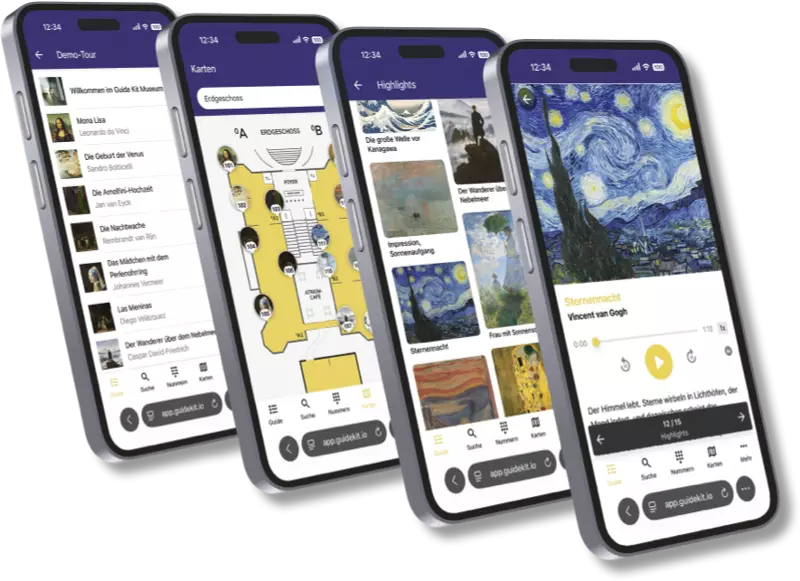
The finished audio guide on a smartphone: list of stops, floor plan, image gallery and audio player. Translation and accessibility
Which languages you need depends on your audience. In the Guide Kit Manager you maintain all language versions in one place, and visitors switch languages with a tap. How many languages are included depends on the plan you choose. Think of accessibility too: transcripts for every track help deaf and hard-of-hearing people, and texts written in simple language reach a wider range of guests. The guide itself complies with the WCAG guidelines.
Put it together in the Guide Kit Manager
Create tours and stops, upload audio, images and videos, and add quiz questions, a floor plan or a GPS map if you like. Each stop gets a number and a QR code, which you download for printing. With your logo, colors and display style, the guide matches the look of your institution. You do not need any prior knowledge, an up-to-date browser is enough. Once the content is ready, an audio guide is often set up within an hour.
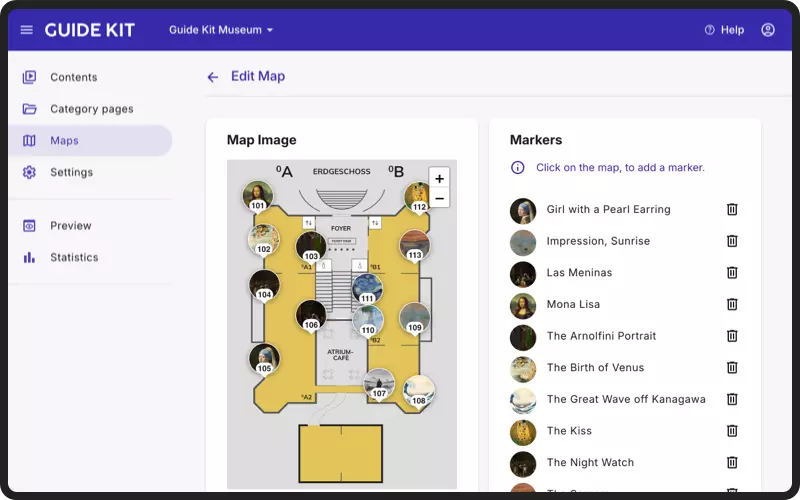
In the Guide Kit Manager you place stops on the floor plan with a click. Test on site
Walk through the tour with your own smartphone and headphones, ideally together with colleagues who do not know the content yet. Check the reception in every room: where the network is weak, visitors download the content in advance, as the offline mode is included in every plan. Also make sure that QR codes are easy to reach and the numbers at the objects are easy to read.
Publish, promote, improve
One click and your audio guide is online. Place the guide's QR code where guests see it: at the entrance, at the ticket desk, on tickets and on flyers. You can also link to it from your website. Brief your team so they can actively recommend the guide. Afterwards, the statistics in the Guide Kit Manager show which tours and stops are used. You can adjust the content yourself at any time, and changes go live immediately.
Having your audio guide made: what we take care of
If you lack the time or experience, we create the audio guide for you. You can hand over everything or just single steps:
- TextsWe write texts for listening based on your material, such as wall labels, catalogs or tour scripts. You approve every stop.
- TranslationInto all the languages of your audience.
- RecordingWith professional voice artists in a recording studio, or with AI voices.
- PhotosBy photographers from our network.
- SetupWe set up the guide in the Guide Kit Manager for you.
- Loan devices and headphonesVia a partner, for guests without a smartphone.
All we need is your existing material and a contact person for questions and approvals.
The difference to a classic production: you do not just get audio files, but a finished guide that your team can maintain itself afterwards. If a new object is added or the opening hours change, there is no need for a new commission. We agree on scope and price individually.
Request a quoteCreating an audio guide for free: what works and what does not
With Guide Kit you create your audio guide for free: the Starter plan costs €0 and includes up to 10 stops, several tours and several languages. AI voices are included too. Publishing is not part of the Starter plan. For that, you choose a paid plan, which you can test free of charge for 30 days, without a credit card and without automatic renewal.
It is completely free without a platform: upload audio files to a cloud storage and put a QR code for each stop on the information board. For a small themed trail, this can be enough. But there is no language selection, offline mode, map, statistics or professional look. Visitors end up in a file player instead of a guide. If the link of a file changes, the printed QR code leads nowhere. Other free platforms often require visitors to install the provider's app first.
See all plans and pricing →Frequently asked questions about creating an audio guide
How long does it take to create an audio guide?
That mainly depends on the content. Once texts, images and recordings are ready, an audio guide is often set up and published with Guide Kit within an hour. Writing, translating and recording the texts takes a few days to a few weeks, depending on the scope. With AI voices, there is no waiting for studio appointments.
How much does it cost to have an audio guide made?
We agree on the price individually. It mainly depends on how many stops and languages the audio guide should have, whether we write new texts or revise existing ones, and whether voice artists or AI voices do the recording. To run the guide, you book one of the monthly plans, which include hosting, updates and support.
Can I create an audio guide for free?
Yes. In the free Starter plan you create a guide with up to 10 stops in several languages and try it out without a time limit. To publish it, you need a paid plan, and each one can be tested free of charge for 30 days.
Do I need a recording studio?
No. You can have your stop texts narrated by realistic AI voices or upload your own recordings, for example made with a smartphone in a quiet room. A recording studio pays off if professional voice artists are to narrate the guide.
Can we change the audio guide ourselves if you created it for us?
Yes. A guide we created for you also runs in the Guide Kit Manager, which you get access to. All content can be adjusted or extended at any time.
Ready for your own audio guide?
Start with Guide Kit for free – no credit card, no commitment. Or arrange a personal walkthrough.